| | | | | With Dynamic Content, you can tailor a single newsletter for every reader. | It's the same approach used by the pros at brands like Morning Brew, TheSkimm, and Axios to deliver personalized newsletters at scale. | This was our most requested feature of 2025. After rolling out early access to Enterprise customers, Dynamic Content is now available more widely 🤝 | And that's not all. Today's release also includes: | 🤖 Automations v3
🌐 Website Builder v2
➕ Bulk Actions | Let's dive in 👇 |
| |
|
| | | | Imagine if every email you sent felt like it was written just for the person reading it.
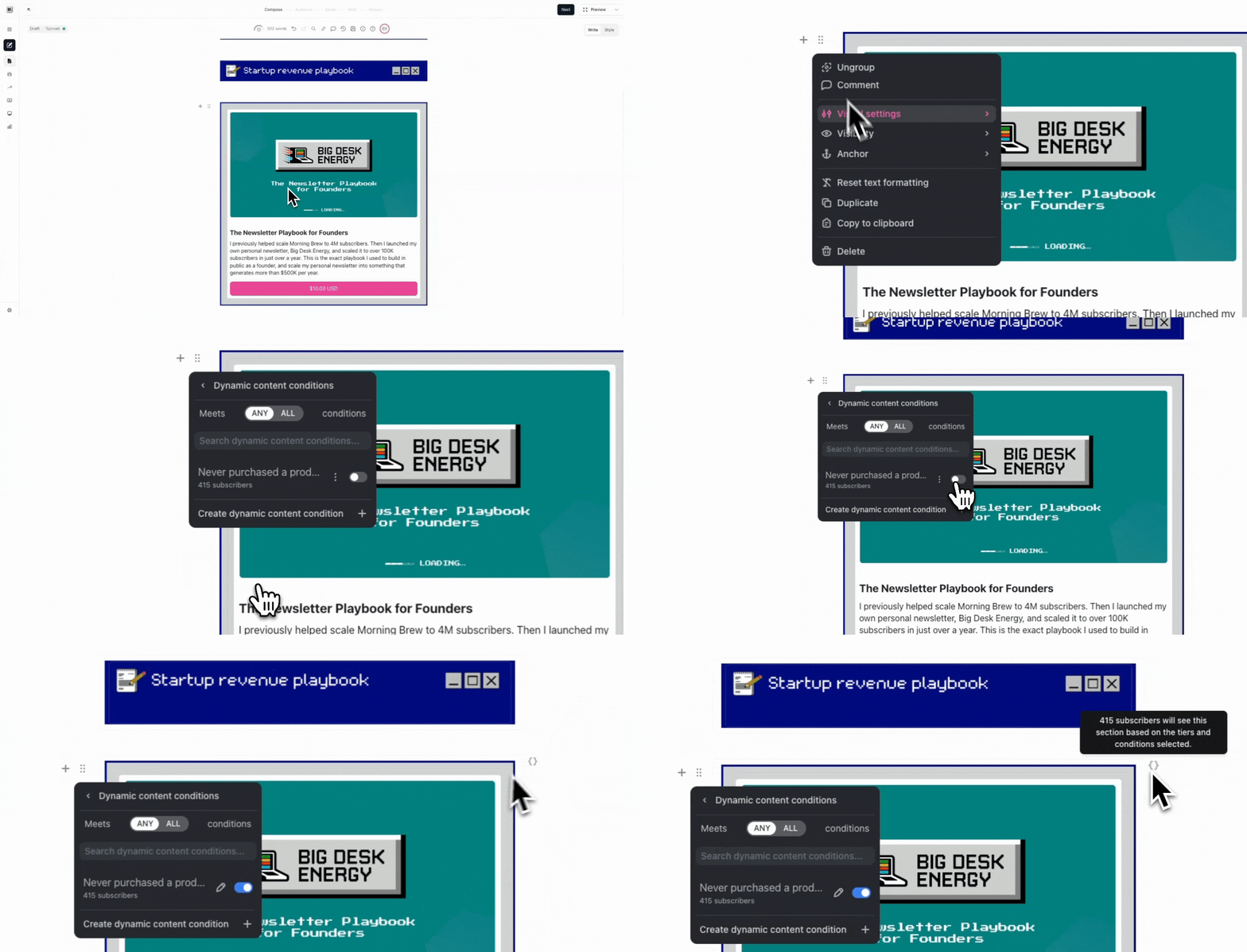
That's the power of Dynamic Content, one of our most requested features ever. | Dynamic Content lets you personalize your emails by showing different content to different readers, all within a single send. There's no code, no custom templating, and no extra complexity. | Here's an example: Say I want to promote a new playbook I'm selling, but only to readers who haven't already bought it. | With Dynamic Content, I can set this up in three simple steps: | Add the digital product to my newsletter Open Visibility Settings and set a new dynamic content condition (e.g., whether a reader has already purchased this playbook) Toggle visibility off for readers who meet that condition
| | When I send my newsletter, past buyers won't see the promotion, but everyone else will. | But why stop there? You can also… | Show different sponsors to different reader cohorts Promote events only to readers in specific regions Nudge readers who haven't completed your onboarding survey
| Dynamic Content is now available to all users on our Max plan. | | Note: Dynamic Content is only available to users on our Max or Enterprise plans. You can learn more and/or upgrade here. |
|
|
| |
|
| | | | Last month, we released Automations v3 — our most powerful automation suite yet. | | But it's not just more capable. It's also easier to use, with a faster, more intuitive design. | Today, we're building on that foundation with a few new additions: | Product Purchase Trigger | You can now start an automation the moment a reader buys one of your digital products. This connects your products to the entire beehiiv ecosystem, unlocking new ways to serve your customers. | Automations Home Base | We also launched a new home base for all of your automations. The redesigned table adds more data, plus improved search, filtering, and sorting. | | | Note: Automations are only available to users on our paid plans. You can learn more and/or upgrade here. |
|
|
| |
|
| | | | Each week, we ship dozens of new features and enhancements to the Website Builder. Here are two of my recent favorites… | Image Carousel | You can now add multiple images within a single image element to create a carousel. It's fully customizable, so you can edit the layout, pagination type, sizing, arrow design, and more. | | Insert Elements from Layers | Instead of dropping new elements onto a webpage and hoping they land in the right place, you can now insert elements directly from the Layers tab, giving you more precision and control over your website design. | | | Note: These features are only available on our v2 Website Builder. If you're still on our Legacy Builder, we've built a 1-click migration that will seamlessly move your site to v2 here. |
|
|
| |
|
| | | | By popular demand, you can now take bulk actions across multiple posts at once. | Simply select the posts you want to update, then: | Add or remove tags Add or remove authors Hide posts from the feed or show them again Archive, unarchive, or delete the posts
| Welcome to content management, simplified. | | |
| |
|
|
|




Comments