GPT-5.6.

Welcome to another edition of AI by Aakash. I follow all the AI news so you don’t have to. This week, the big news is out of OpenAI. GPT-5.6 feels like, for the first time in a long time, OpenAI has come out with a better model than Anthropic. And it shipped with a new harness too.
So that’s today’s deep dive. But first, a word from our sponsor. In Partnership withViktor: 5x More Work DoneFounders keep telling the Viktor team the same thing. One: "If you compare this to a VA or an employee it's not even a conversation. This is doing what an employee would do and it's doing it much much faster, better and much cheaper." Another paying team: "We can get 5x as much work done now." Viktor is an AI employee that lives in Slack and Microsoft Teams. It connects to 3,200+ tools you already use, runs scheduled tasks on its own, and hands back real deliverables: PDFs, decks, internal apps, code PRs. You stay in control, anything sensitive waits for your approval. 40,000+ teams have already hired one.
Try Viktor free, $100 in starting credits → This Week’s AI NewsTop News: We Have New ModelsChatGPT launched 5.6, which I cover in depth in today’s deep dive. But we also saw new models from Tinker, Meta, and xAI this week. What should you make of everything coming out? Basically everyone besides OpenAI and Anthropic have stopped fighting over who has the smartest chatbot and started fighting over who can run your work cheapest:
None of these models need your attention as a consumer. But if you’re building a product, it’s worth running the cheap ones through your evals. The price gaps are now big enough to matter. The Other News That Mattered
Resources
Tools
Deep DiveComplete Guide: GPT-5.6ChatGPT just had its biggest update in a year. On July 9, OpenAI shipped the GPT-5.6 models and merged ChatGPT with Codex into one app. Combined with the leading ImageGen model, I feel like OpenAI has the best $20/month plan in AI right now. You should be taking advantage of it. So here’s how to get the most out of ChatGPT-5.6:
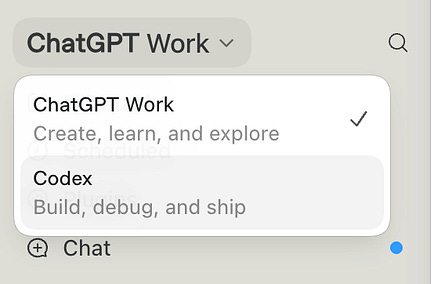
1. What Actually ChangedOpenAI took two apps and made them one, with three tabs inside:
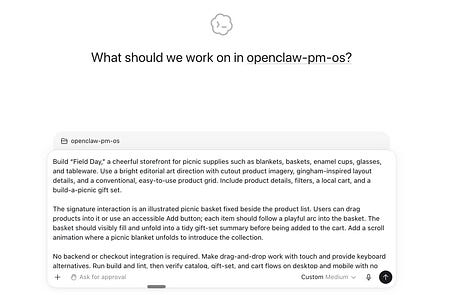
Work is the delegate-and-walk-away mode. You give it a goal, it reads your files and connected apps, works for hours if it needs to, and comes back with the finished document, spreadsheet, or presentation. Work and Codex are the same agent tuned for different jobs, which is why the two tabs look alike. It’s on every plan, including Free, and if you read my guide to Claude Cowork, this is OpenAI’s answer, shipped to hundreds of millions of people at once. Three more changes worth 30 seconds each:
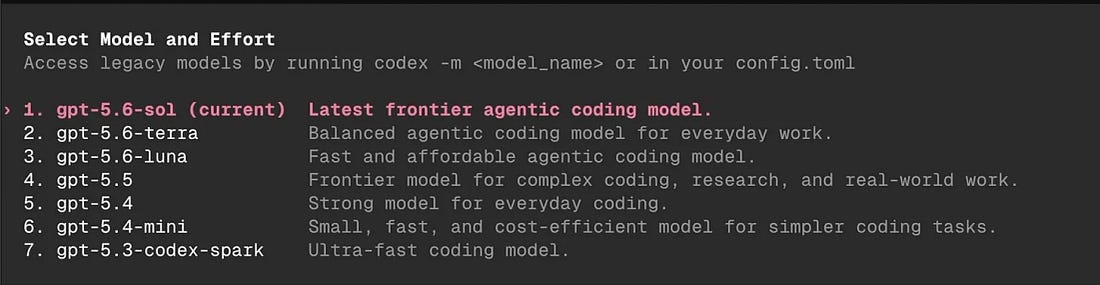
2. Sol, Terra, and LunaGPT-5.6 comes as three models:
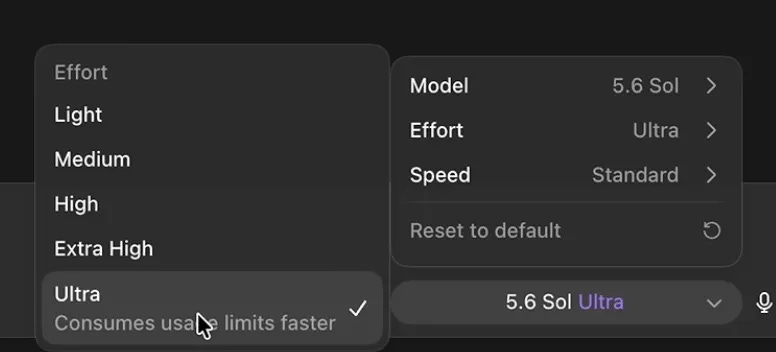
Sol is the senior hire. It’s like Fable. Use it for complex work and long tasks. Terra is the mid-tier. It’s like Sonnet. It matches the old GPT-5.5 on everyday work at half the price, and it does what you asked, exactly. Luna is the intern. It’s like Haiku. I use Sol for everything, but if you have a budget, rely on Terra as your driver with Sol for the hardest tasks. 3. Pick Your Thinking Level and Skip UltraThinking levels are how long the model gets to sit with your problem before answering, from a quick glance at Light to a long stare at Max. Medium is the right setting for almost everything, and High is for when something is truly hard. Then there’s Ultra, which sits in the thinking menu but behaves like a different product.
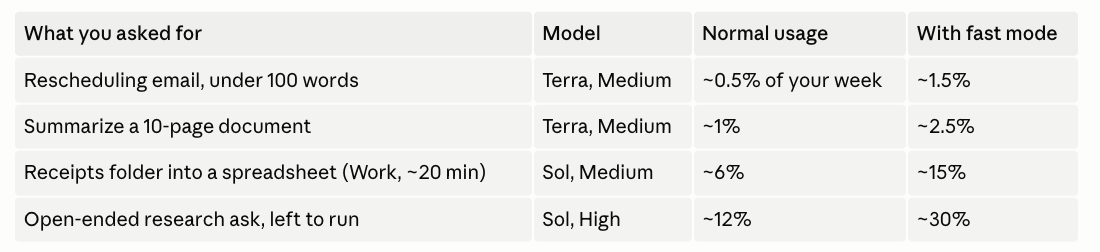
Ultra hires four copies of the model at once and splits your task between them. Every copy runs at the most expensive thinking setting, the copies can hire copies of their own, and there’s currently no dial to turn any of them down. Each one bills you separately. Theo blew his entire 5-hour allowance in 20 minutes on a single Ultra run with fast mode on, got a manual reset, and drained that one in another 40. OpenAI has since hidden Ultra from the app’s main model slider, which tells you how they think it’s going. Skip it. 4. How to Not Burn Your LimitsThree rules until the dust settles:
5. Prompt Less, Get MoreForget the models for a minute. The most useful thing OpenAI shipped last week was a short guide on how to talk to the new ones, and its core advice fits in a sentence: Describe the destination, stop prescribing the route. We all learned to write long, detailed prompts because the old models gave up without them. The new ones figure out the steps, so your extra instructions now get in the way. There is one thing these models need more of, and that’s brakes. GPT-5.6 keeps going. Left alone it does the task, then the follow-up you never asked for. The fix is a stop point, written right into the ask: That’s the whole formula. The goal, then exactly where to stop and show you. Use it on anything longer than a question. Keep in every prompt:
Cut from every prompt:
Do this today. Take your longest saved prompt and run it through the two lists above. Cut one instruction at a time and rerun the task. If nothing got worse, that instruction was costing you tokens on every run. Me around the webI joined Rupinder Singh's podcast for a full Claude Code masterclass covering how PMs should actually work with AI in 2026: 
That’s all for today. See you next week, Aakash
P.S. Want my AI tool stack? Join my bundle. Want my job search coaching? Apply to my cohort. AI by Aakash is free today. But if you enjoyed this post, you can tell AI by Aakash that their writing is valuable by pledging a future subscription. You won't be charged unless they enable payments.
|








Comments